

When you’re about to buy a phone, a quick IMEI check can be the difference between a great deal and an expensive mistake. Many buyers skip this step and only discover problems after paying. With Movical, you can verify the IMEI in minutes and know exactly what you’re getting. You don’t need technical skills, just the phone in your hand and an internet connection. Movical turns a risky second-hand purchase into a safe, informed decision. Before you hand over cash or confirm an online order, let Movical confirm the phone is truly worth it.
How to Locate an IMEI Number on Any Smartphone
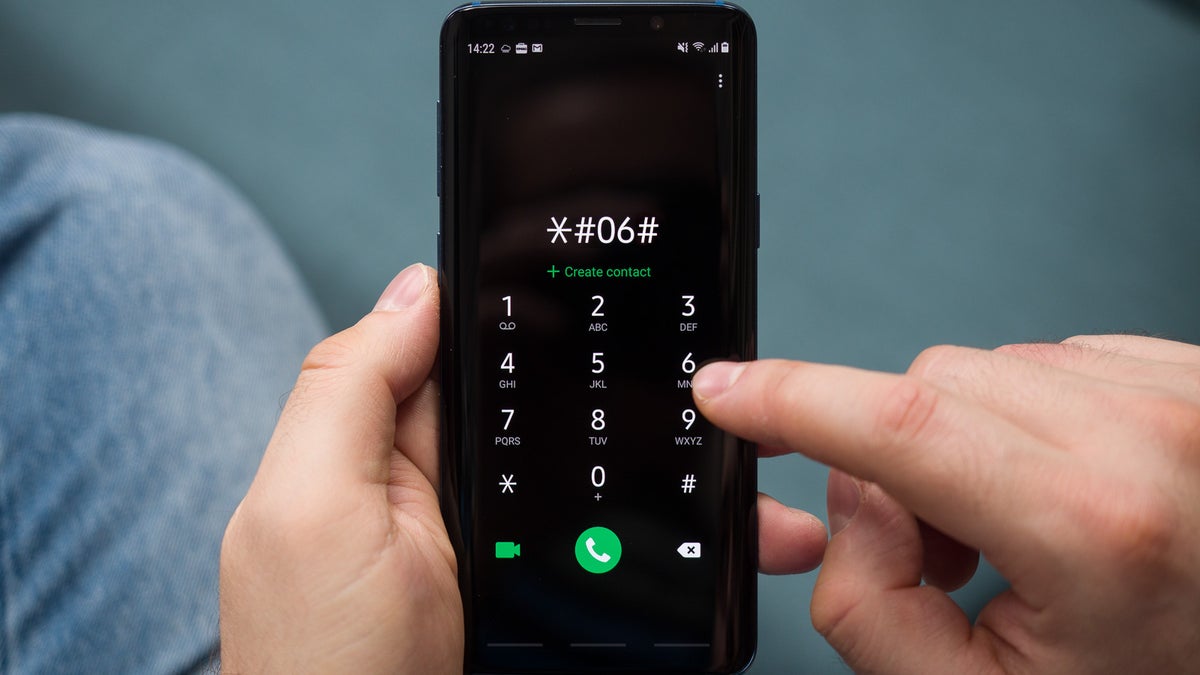
Finding the IMEI number is easy once you know where to look. On most phones, you can dial *#06# and the IMEI appears on screen instantly. You’ll also find it in the device settings and sometimes printed on the SIM tray or box. Movical gives clear, simple instructions for each brand so you don’t waste time searching. Once you’ve got the IMEI, you’re ready to run a fast, reliable check with Movical.
Simple ways to find your IMEI
- Dial *#06# on the phone’s keypad.
- Check “About phone” or “Status” in the settings menu.
- Look on the SIM card tray or the back of the device.
- Check the original box or purchase invoice, if available.
Running an IMEI Check Before Meeting a Seller
Meeting a seller without verifying the IMEI is a big risk. A phone can look perfect but still be blocked, unpaid, or reported as lost or stolen. With Movical, you can run an IMEI check before you even leave home, so you only meet sellers whose phones pass basic verification. If you’re already on the way, you can still check from your mobile in seconds. This gives you confidence to walk away from bad deals and move quickly on good ones.
What Movical helps you confirm
- If the phone is reported lost or stolen.
- If the device is network blocked or blacklisted.
- Whether it might be tied to unpaid contracts.
- Basic compatibility and model details.
Verifying Phone Status When Buying Online
Buying from online marketplaces or classifieds adds another layer of risk. Photos and descriptions can be misleading, and sellers can disappear after the sale. Movical lets you request the IMEI from the seller and check the phone’s status before you pay or commit. If a seller refuses to share the IMEI, that’s already a red flag that protects you. By using Movical, you bring real transparency into an environment where trust is often low.
Smart steps for safer online purchases
- Ask the seller for clear photos and the IMEI number.
- Run an IMEI check on Movical before sending any payment.
- Compare Movical’s phone details with the listing description.
- Avoid sellers who refuse or delay sharing the IMEI.
Identifying Hidden Issues With Second-Hand Devices
Second-hand phones often hide problems you can’t see at a glance. The device might power on and look fine, yet still be unusable on many networks. An IMEI check with Movical reveals issues that visual inspection and a quick test call can’t catch. You’ll know if the phone has a suspicious history or potential restrictions. This helps you avoid phones that could stop working days or weeks after purchase.
Hidden problems Movical can uncover
- Blacklisted or blocked IMEIs.
- Devices associated with theft or loss.
- Inconsistent model information that suggests tampering.
- Potential limitations for unlocking or using abroad.
Why Pre-Purchase IMEI Checks Save Time and Money
Fixing a bad phone purchase is frustrating, slow, and often impossible. You may spend hours contacting the seller, chasing support, or dealing with your carrier, only to end up buying another device. A quick IMEI check with Movical before purchase cuts off those problems at the source. For a few minutes of effort, you protect your money and avoid months of hassle. It’s one of the simplest, highest-value checks you can do as a buyer.
Benefits of checking with Movical first
- Avoid wasting money on blocked or unusable phones.
- Reduce the risk of scams and dishonest sellers.
- Save time on returns, disputes, and carrier issues.
- Buy with confidence, even in the second-hand market.
Making Smarter Buying Decisions With Minimal Effort
Most people don’t want a complex technical process; they just want to know if a phone is safe to buy. Movical is designed for that: quick IMEI check, clear results, and simple guidance on what to do next. You get the essential information you need without digging through confusing technical reports. This turns every phone purchase into a smarter, more controlled decision. With Movical, you keep the good deals and leave the risky ones behind.
Take your next step with Movical
- Have an IMEI already? Run a check on Movical now before you buy.
- About to meet a seller? Save the Movical site and check on the spot.
- Shopping online? Ask for the IMEI and verify it with Movical before paying.
A few seconds with Movical can protect your money, your time, and your peace of mind. Make IMEI checks part of every phone purchase, and you’ll never buy in the dark again.